What Does a VPN Hide? Your Privacy Questions Answered

A VPN (Virtual Private Network) is defined as an encrypted tunnel between your device and the internet that hides your real IP address and conceals your browsing activity from outside observers. Understanding what does a VPN hide, and equally what it does not, is the difference between real privacy and a false sense of security. A VPN masks your location, encrypts your traffic, and stops your ISP from reading your online activity. It does not make you invisible. Log into Google or Facebook, and those platforms know exactly who you are regardless of which VPN you use.
What does a VPN hide online?
A VPN conceals several specific types of data, and knowing each one helps you use it correctly.
- Your real IP address. Every device on the internet has an IP address that reveals your approximate location and identifies you to websites. A VPN replaces your IP with the server’s IP, so sites see the server’s location instead of yours. IP address replacement also hides your geographic location, which matters for both privacy and access.
- Your traffic content from your ISP. Without a VPN, your internet service provider can read unencrypted traffic and log the domains you visit. With a VPN, that traffic is encrypted before it leaves your device, so your ISP sees only that you are connected to a VPN server.
- DNS queries. Every time you type a web address, your device sends a DNS query to resolve it. Without protection, those queries go to your ISP’s servers in plain text. A VPN routes DNS queries through its own servers, hiding the sites you look up. Good VPN services include DNS leak protection to prevent accidental exposure.
- Your browsing domains on public Wi-Fi. Coffee shops, airports, and hotels run open networks where anyone with the right tools can intercept traffic. A VPN encrypts your connection on those networks, stopping local eavesdroppers from seeing what you do.
- Your traffic type from your ISP. ISPs sometimes throttle streaming or gaming traffic by identifying the type of data you send. A VPN hides the traffic type, which can reduce throttling and improve performance.
Pro Tip: Turn your VPN on before connecting to any public Wi-Fi, not after. The moment you join an open network, your device starts sending data. Connecting to the VPN first closes that window.
What a VPN does not hide
This is where most people get it wrong. A VPN is a privacy tool, not an anonymity tool, and full anonymity requires additional measures beyond a VPN alone.
- Your identity when logged into accounts. Google, Facebook, Amazon, and every other platform you sign into know who you are. Your account login overrides any IP masking. 76.9% of users understand that VPNs protect against location profiling but overlook that logged-in accounts still reveal identity completely.
- Browser fingerprinting. Websites can identify you using your screen resolution, installed fonts, browser version, timezone, and dozens of other device attributes. This technique, called browser fingerprinting, works even when your IP is masked. It is one of the most underestimated tracking vectors online.
- Tracking cookies. Cookies stored in your browser persist across sessions and across sites. A VPN does nothing to clear or block them. Advertisers use cookies to build profiles of your behavior regardless of which IP address you browse from.
- The fact that you are using a VPN. Your ISP cannot see your traffic content, but it can detect that you are connected to a VPN server. Traffic volume and timing remain visible even when the content is encrypted.
- Malware and phishing attacks. A VPN encrypts your connection. It does not scan files, block malicious sites, or protect you from clicking a bad link. VPN users still need antivirus software and good security habits.
A VPN shifts trust from your ISP to your VPN provider. Your provider can technically see your traffic, which is why choosing one with a verified no-logs policy is not optional. It is the whole point.
How a VPN protects your location and online identity
The most practical vpn privacy benefit for most people is location masking. When you connect through a VPN server in another city or country, websites and services see that server’s IP address instead of yours. This has two direct effects.
First, it hides your approximate geographic location from sites that use IP-based geolocation. Second, it lets you bypass geo-restrictions by presenting an IP from a different country, which is useful for accessing content libraries or services unavailable in your region.
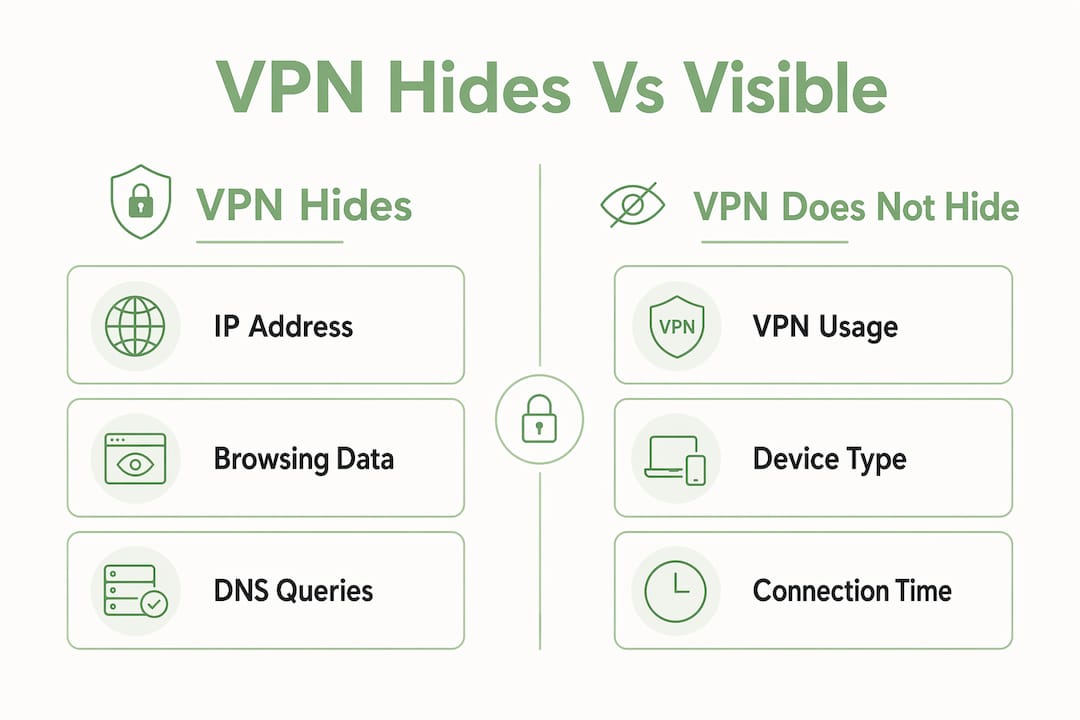
| What the VPN hides | What remains visible |
|---|---|
| Your real IP address | That you are using a VPN |
| Browsing domains from your ISP | Your identity via logged-in accounts |
| Traffic content and type | Browser fingerprint |
| DNS queries | Traffic volume and timing |
| Your location via IP | Cookies and persistent sessions |
ISP throttling is a related benefit. Some ISPs slow down streaming or gaming traffic once they identify the data type. Because a VPN hides the traffic type, the ISP cannot selectively throttle it. Rapidrabbit uses the WireGuard protocol, which is widely regarded as the gold standard for VPN efficiency, and routes your connection through less congested paths to reduce buffering and latency.
Pro Tip: If you want to check whether your VPN is actually hiding your IP and DNS queries, use a site like ipleak.net before and after connecting. A real IP or DNS leak means your VPN is not doing its job.
VPN vs. HTTPS, private browsing, and Tor
Each privacy tool solves a different problem. Knowing which one to reach for matters.
HTTPS encrypts the content of your connection between your browser and a specific website. It stops someone from reading the data in transit, but it does not hide which site you visited from your ISP or from network observers. A VPN adds a layer on top by hiding the destination from your ISP entirely. HTTPS and VPNs work together, not in competition.
Private or incognito browsing clears your local history, cookies, and session data when you close the window. It does not hide your activity from your ISP, your employer’s network, or the websites you visit. Many people assume incognito mode provides network privacy. It does not. It only protects what is stored on your device.
Tor routes your traffic through multiple volunteer-operated nodes, making traffic analysis significantly harder. It offers stronger anonymity than a VPN but at the cost of speed and convenience. For most everyday users, a VPN is the right tool. Tor is better suited for situations where anonymity is critical and speed is secondary.
A layered privacy approach combines a VPN with antivirus software, a password manager, and two-factor authentication. No single tool covers everything. Each one closes a different gap.
Key takeaways
A VPN hides your IP address, encrypts your traffic, and conceals your browsing from your ISP, but it cannot protect your identity when you are logged into accounts or block browser fingerprinting and cookies.
| Point | Details |
|---|---|
| IP and location masking | A VPN replaces your real IP with the server’s IP, hiding your location from sites and ISPs. |
| Traffic encryption | Your ISP sees only that you use a VPN, not which sites you visit or what you send. |
| VPN limitations | Logged-in accounts, cookies, and browser fingerprinting all bypass IP-based privacy. |
| Trust shift to provider | Choose a VPN with an audited no-logs policy, since the provider can see your traffic. |
| Layered privacy needed | Combine a VPN with antivirus, strong passwords, and 2FA for real protection. |
Why most people misread what a VPN actually does
I have spent years watching people treat a VPN as a magic privacy switch. They turn it on and assume they are invisible. That assumption is the most dangerous thing about VPN marketing.
The honest reality is that a VPN solves a specific problem well. It stops your ISP from reading your traffic and protects you on public Wi-Fi. Those are genuinely valuable protections. But the moment you log into any account, you hand your identity directly to that platform. No VPN changes that.
The trust shift point deserves more attention than it gets. Choosing a no-logs provider with independent audits, like ProtonVPN or NordVPN have pursued, is not a nice-to-have. It is the core question. A VPN that logs your activity and hands it over on request is worse than useless. It is a false promise.
My practical advice: use a VPN on every public network without exception. Use it at home if you do not want your ISP building a profile of your browsing. But also clear cookies regularly, consider a browser with fingerprint resistance like Firefox with uBlock Origin, and use unique passwords with a manager like Bitwarden. A VPN is one strong layer. It is not the whole wall.
For users on Windows, Linux, or Android, getting started is straightforward. The privacy tools available for each platform make building that layered approach easier than it has ever been.
— Darius Helzinski
Stay private online with Rapidrabbit
Rapidrabbit is built for people who want real privacy without needing a technical background. It runs on Windows, Linux, and Android, uses the WireGuard protocol for fast and secure connections, and keeps your IP hidden and your traffic encrypted from the moment you tap the carrot.

Public Wi-Fi at the airport? Rapidrabbit keeps your data safe. Want to stop your ISP from watching what you browse? Rapidrabbit handles that too. No complicated setup, no jargon. Just private, fast browsing from day one. See how Rapidrabbit works and try it free. Your data belongs to you, and Rapidrabbit keeps it that way. Start protecting your privacy today.
FAQ
What does a VPN hide from my ISP?
A VPN hides the specific websites you visit, your traffic content, and your DNS queries from your ISP. Your ISP can still see that you are connected to a VPN server and how much data you transfer.
Does a VPN hide my browsing history?
A VPN hides your browsing domains from your ISP and network observers, but it does not delete your local browser history. Your browsing history on your device remains unless you clear it manually.
Can a VPN hide my location?
A VPN masks your IP-based location by replacing your real IP with the VPN server’s IP address. It cannot hide your location if you have granted a website or app permission to access your device’s GPS.
Does a VPN hide my identity on social media?
No. When you are logged into Facebook, Instagram, or any other platform, that platform knows who you are regardless of your IP address. A VPN does not conceal your identity from services where you have an active account.
What does a VPN not protect against?
A VPN does not protect against malware or phishing attacks, browser fingerprinting, tracking cookies, or identity exposure through logged-in accounts. Antivirus software and good security habits are still required alongside a VPN.