HTTPS vs VPN Difference: What You Really Need to Know
Most people assume that the padlock icon in their browser means they’re fully protected online. That assumption is wrong, and understanding the HTTPS vs VPN difference is exactly where real online privacy begins. HTTPS and VPN technology both encrypt data, but they work at completely different levels and protect against completely different threats. One secures the contents of your conversations. The other hides the fact that you’re having them. Knowing which does what, and when you need both, is the foundation of practical online security in 2026.
Table of Contents
- Key Takeaways
- HTTPS vs VPN difference explained: what each one actually does
- How a VPN protects your privacy beyond HTTPS
- Side-by-side comparison of HTTPS and VPN
- When to use HTTPS, a VPN, or both
- My honest take on HTTPS, VPNs, and what actually matters
- Stay protected beyond the padlock
- FAQ
Key Takeaways
| Point | Details |
|---|---|
| HTTPS encrypts content | HTTPS secures the data between your browser and a website, but not your identity or browsing metadata. |
| VPNs protect your whole connection | A VPN tunnels all device traffic, masking your IP address and hiding your activity from your ISP. |
| Metadata stays exposed with HTTPS | Even on HTTPS sites, your ISP can see which domains you visit unless you also use a VPN. |
| Both work best together | HTTPS and VPN complement each other. Using both gives you layered protection against different threats. |
| VPN provider trust matters | A VPN shifts trust from your ISP to your provider, so choosing a reputable service with a no-logs policy is critical. |
HTTPS vs VPN difference explained: what each one actually does
Let’s start with HTTPS, which stands for HyperText Transfer Protocol Secure. It is the standard protocol your browser uses to communicate with websites. The “S” means the connection is encrypted using TLS (Transport Layer Security). When you log into your bank or buy something online, HTTPS makes sure the data you send and receive can’t be read by anyone intercepting it mid-transit.
As of 2026, HTTPS is standard for the vast majority of web traffic. That’s genuinely good progress. But HTTPS only protects the content of your communication with a specific website. It does not protect everything else.
Here’s what HTTPS does not cover:
- Your IP address is visible to the website and to anyone watching your network
- DNS queries are typically unencrypted, meaning the domain names you look up can be seen by network observers unless you’ve specifically enabled DNS over HTTPS (DoH) or DNS over TLS (DoT)
- SNI (Server Name Indication) leaks the domain name you’re connecting to during the TLS handshake, even before the encrypted session starts
- Your ISP can still see which sites you visit and when, even if they can’t read the content
- Apps outside your browser send unencrypted or minimally protected traffic that HTTPS never touches
The padlock icon tells you the pipe is secure. It says nothing about who can see you using that pipe.
Pro Tip: Check your browser settings and enable DNS over HTTPS if you want to close one of the biggest gaps HTTPS leaves open. It’s a small change with a real privacy impact.
How a VPN protects your privacy beyond HTTPS
A VPN, short for Virtual Private Network, works at the network layer rather than the application layer. Instead of securing one browser tab, it creates an encrypted tunnel for all traffic leaving your device. Every app, every background process, every DNS request gets routed through that tunnel.

When you connect to a VPN, your IP address is replaced by the IP address of the VPN server. Websites, advertisers, and anyone watching your network see the VPN server, not you. Your ISP sees encrypted traffic going to the VPN server. That’s it. They can’t see the destinations or the content.
That’s a fundamentally different kind of privacy than what HTTPS offers. VPNs protect all traffic across all apps by tunneling at the network layer, while HTTPS only protects individual application-layer connections. Think of it this way: HTTPS locks the letter inside the envelope. A VPN hides the envelope, the mailbox, and your address.
Modern VPNs built for real privacy also include:
- Kill switches that block all traffic if the VPN connection drops unexpectedly, preventing accidental IP exposure
- DNS leak protection to make sure your DNS queries stay inside the encrypted tunnel
- Obfuscation technology that makes VPN traffic look like HTTPS to bypass firewalls and surveillance in restrictive networks
That last point is significant. In countries with heavy censorship, VPN obfuscation is the difference between accessing the open internet and being blocked completely.
One critical point worth repeating: a VPN shifts trust from your ISP to your VPN provider. If your VPN provider logs your activity and sells it or hands it over, you’ve traded one privacy risk for another. This is why choosing a reputable, independently audited VPN with a verified no-logs policy is not optional. It’s the whole point.
Pro Tip: Always look for a VPN that publishes the results of independent third-party audits. Marketing claims are easy to make. Audit reports are harder to fake.
Side-by-side comparison of HTTPS and VPN
Here’s where the HTTPS vs VPN comparison gets concrete. These two technologies overlap in one area (both use encryption) and diverge sharply everywhere else.
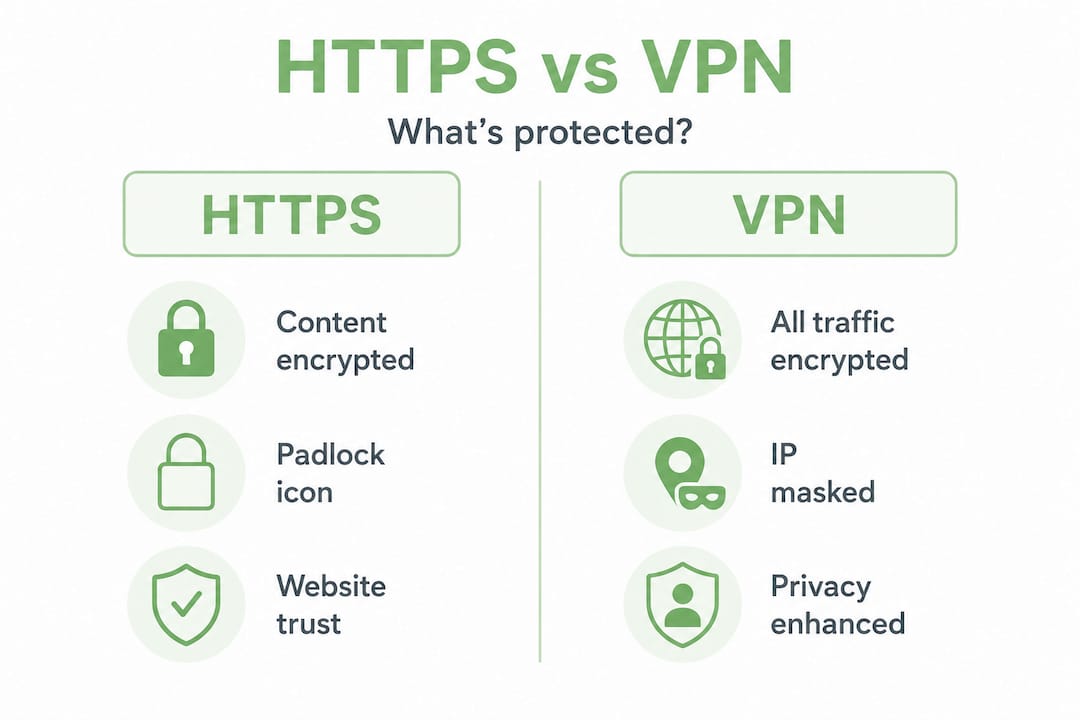
| Feature | HTTPS | VPN |
|---|---|---|
| What gets encrypted | Browser-to-website content | All device traffic across all apps |
| Hides your IP address | No | Yes |
| Hides DNS queries | Only with DoH/DoT | Yes (routes through tunnel) |
| ISP can see your activity | Yes (sites visited, timing) | No (sees only VPN server) |
| Protects non-browser apps | No | Yes |
| Bypasses geo-restrictions | No | Yes |
| Metadata protection | No | Yes |
| Works automatically | Yes (site-side) | Requires VPN client |
| Trust requirement | Website’s certificate | VPN provider |
The critical difference is metadata. HTTPS protects content but leaves metadata exposed. Your ISP, network administrator, or anyone monitoring your connection can see which sites you visited, how often, and for how long. That behavioral data is genuinely valuable to advertisers and surveillance systems. A VPN conceals it.
What a VPN does not replace is HTTPS. If you’re using a VPN but connecting to an HTTP site (no HTTPS), your traffic is encrypted between you and the VPN server, but unencrypted between the VPN server and the website. Both layers serve a purpose and neither makes the other redundant.
When to use HTTPS, a VPN, or both
Understanding the differences is useful. Knowing when to apply them is where it gets practical.
-
Trusted home network, casual browsing. If you’re checking the news on your own secured home Wi-Fi, HTTPS alone covers the content-security basics. Your ISP still sees your destinations, but the exposure is relatively low. Whether that’s acceptable depends on your personal privacy standards.
-
Public Wi-Fi in cafés, airports, or hotels. This is where a VPN becomes non-negotiable. VPNs add significant protection on public Wi-Fi, where other users on the same network could intercept unencrypted traffic from your apps, not just your browser. The combination of HTTPS plus VPN here is the right call every time. You can learn more about staying safe on public networks and why unprotected connections leave you exposed.
-
Avoiding ISP tracking and targeted advertising. HTTPS doesn’t help here. Your ISP sees every domain you visit and can sell or use that data. A VPN solves this directly.
-
Bypassing geographic restrictions or censorship. HTTPS has no role here. A VPN with solid server options and obfuscation does.
-
Maximum privacy for sensitive work. Use both. HTTPS secures the content layer. A VPN secures the metadata layer and masks your identity. Together, they cover far more ground than either one alone.
A few myths worth clearing up. A VPN does not make you anonymous. It masks your IP and encrypts your traffic, but it can’t protect against browser fingerprinting, cookies, or logging into accounts that identify you. It also won’t protect against phishing or malware. These are separate problems that need separate solutions.
Pro Tip: If you’re logging into your personal Google account while using a VPN, Google still knows it’s you. A VPN protects your network identity, not your account identity.
My honest take on HTTPS, VPNs, and what actually matters
I’ve spent a lot of time watching people make the same two mistakes. The first is assuming the padlock icon means they’re private. The second is assuming a VPN makes them invisible.
Neither is true. What I’ve found is that most people don’t need to become security experts. They just need to understand that HTTPS and VPN solve different problems. HTTPS is built into the web and handles content security automatically. A VPN is a choice you make to protect your identity and your metadata.
In my experience, the VPN provider question is where people go wrong most often. I’ve seen services make bold privacy promises that fall apart under scrutiny. The fact that some VPN providers have been linked to criminal infrastructure isn’t a reason to avoid VPNs entirely. It’s a reason to pick carefully. Independent audits, transparent ownership, and a genuine no-logs policy are the filters worth using.
My practical advice: don’t treat VPN as a luxury or an IT-professional tool. Treat it as a basic habit, especially any time you’re on a network you didn’t set up yourself. Pair it with HTTPS (which you’re already using automatically) and you’ve built a genuinely layered defense without needing to understand a single line of code.
— Darius Helzinski
Stay protected beyond the padlock

HTTPS gets you part of the way there. A trustworthy VPN takes you the rest. Rapidrabbit is built on WireGuard, which is widely regarded as the gold standard for VPN performance and security. It’s fast, light, and built for people who want real protection without reading a technical manual.
Whether you’re on public Wi-Fi, at home, or hopping around the web , Rapidrabbit keeps your data private and your IP address yours. It runs on Windows, Linux, and Android, with iOS coming soon. Find out why VPN matters for everyday browsing, or see how it works under the hood. Ready to try it? Start protecting yourself today. FREE TRIAL AVAILABLE.
FAQ
What is the main difference between HTTPS and a VPN?
HTTPS encrypts the content of your communication between your browser and a website. A VPN encrypts all traffic from your device and hides your IP address and browsing metadata from your ISP and network observers.
Is HTTPS enough for online security?
HTTPS is necessary but not sufficient. It secures content, but your IP address, DNS queries, and which sites you visit remain visible to your ISP and anyone monitoring your network unless you also use a VPN.
Can a VPN replace HTTPS?
No. A VPN protects your identity and metadata at the network level, but it doesn’t replace the content security that HTTPS provides between your browser and a website. You need both for complete coverage.
Does a VPN make you anonymous online?
No. A VPN masks your IP address and encrypts your traffic, but it cannot protect against browser fingerprinting, cookies, or account-based identification. It reduces tracking but does not eliminate it.
When should I use a VPN?
Use a VPN on public Wi-Fi, when you want to stop your ISP from tracking your browsing habits, or when accessing geo-restricted content. Pairing a VPN with HTTPS gives you the strongest practical protection for everyday internet use.