Why Gamers Use VPNs: Benefits, Risks, and Reality
A VPN is not a magic ping reducer, but that is only one tiny part of the gaming story. The real value is often smoother traffic, better route choice, and more control over how your connection reaches a game server. A good VPN can help you avoid congested ISP routes, choose an endpoint that has a cleaner path to the game server, reduce jitter in some situations, and keep your home IP private from hostile players. It can also help with buffering problems when launchers, cloud gaming services, downloads, streams, or voice chat are being slowed or poorly routed. This guide explains where a gaming VPN helps, where it does not, and how to use one sensibly.
Table of Contents
- Key takeaways
- Why gamers use VPNs for protection and privacy
- VPNs and gaming connection quality
- Accessing geo-restricted content and servers
- Risks and limitations you need to know
- How to set up a VPN for gaming the right way
- My honest take on VPNs for gaming
- Try Rapidrabbit for your gaming setup
- FAQ
Key takeaways
| Point | Details |
|---|---|
| Traffic smoothing can help | A VPN can sometimes reduce jitter and packet loss by giving your gaming traffic a steadier route. |
| Endpoint choice matters | Choosing a VPN endpoint with a less congested path to the game server can improve stability, especially at peak times. |
| Buffering problems may improve | VPNs can help when downloads, cloud gaming, game updates, streams, or voice chat are affected by throttling or poor routing. |
| DDoS protection is real | Masking your IP stops attackers from targeting your home connection directly in competitive games. |
| WireGuard is best for gaming | A lightweight protocol helps keep overhead low while still giving you routing control and privacy. |
Why gamers use VPNs for protection and privacy
The single most practical reason competitive gamers run a VPN has nothing to do with ping. It’s about keeping their IP address private.
In peer-to-peer games like older versions of Call of Duty or Rainbow Six Siege, your real IP address can be visible to other players. That’s a serious problem. A motivated opponent can use that IP to launch a DDoS attack against your home connection, knocking you offline mid-match. With a VPN active, attackers see the VPN server’s IP instead of yours. The attack hits the VPN provider’s infrastructure, which is built to absorb it. Your connection stays up.
This is one of the most concrete gaming VPN advantages out there, and it’s completely separate from the latency conversation. VPNs mask your real IP, making it significantly harder for someone to target your specific connection.
Privacy on public Wi-Fi is another angle most gamers overlook. If you’re at a hotel, airport, or café grinding ranked matches, your traffic is on a shared network. Anyone on that same network with basic tools can intercept unencrypted data. A VPN encrypts your gaming traffic so that even on a sketchy public connection, your session stays private.
Here’s what VPN protection actually covers for gamers:
- IP masking: Hides your home address from other players and potential attackers
- DDoS deflection: Redirects attacks to VPN servers instead of your home connection
- Public Wi-Fi encryption: Secures your data on shared networks
- Reduced tracking: Stops advertisers and third parties from profiling your gaming habits
One important caveat: VPN protection only works at the network layer. If a game or app leaks your real IP through other means, like a direct connection outside the VPN tunnel, the protection breaks down. This is called a VPN IP leak, and it’s worth checking for with any VPN you use.
Pro Tip: Before trusting a VPN for DDoS protection, run an IP leak test at a site like ipleak.net while connected. If your real IP shows up, the VPN isn’t fully protecting you.
VPNs and gaming connection quality
For gaming, the more useful question is not simply “will this lower my ping?” It is “does this give my traffic a better, smoother, less congested path to the server?”

Raw ping still matters, especially in competitive shooters, but it is not the whole experience. Jitter, packet loss, traffic shaping, ISP congestion, overloaded routes, and unstable peering can make a game feel worse than the average ping number suggests. A VPN gives you another route to try. Instead of accepting the default route chosen by your ISP, you can connect through a VPN endpoint that may have a cleaner path towards the game server.
This is where a gaming VPN can be genuinely useful. During busy evening hours, your normal ISP route may be congested. A nearby VPN endpoint may avoid that bottleneck and carry your traffic through a better backbone route. The average ping might stay similar, or even rise slightly, but the connection can feel smoother if jitter and packet loss drop.
| Scenario | How a VPN can help |
|---|---|
| Peak-time ISP congestion | Routes traffic through a different endpoint that may avoid the busy path. |
| High jitter or packet spikes | Can smooth traffic if the VPN route is more stable than the default ISP route. |
| Poor routing to one game server | Lets you test alternative endpoints closer to the game server or better connected to it. |
| Cloud gaming or launcher buffering | May help if buffering is caused by throttling, bad peering, or a congested delivery route. |
| Voice chat or stream instability | Can stabilise traffic when Discord, party chat, streaming, or game downloads are being poorly handled by the current route. |
The key is endpoint choice. You are not just picking the VPN server closest to your house. You are looking for the endpoint with the best route between you and the game service. Sometimes that is nearby. Sometimes it is closer to the game server. Sometimes it is simply on a less congested network.
Buffering is another overlooked gaming issue. It is not just about Netflix or YouTube. Game launchers, patches, cloud gaming sessions, remote play, Twitch streams, Discord calls, and in-game media can all suffer when your ISP route is congested or traffic-shaped. A VPN can sometimes make those flows more consistent because the ISP can no longer classify and treat the traffic in the same way.
There is still a tradeoff. A VPN adds an extra hop, so it can add some overhead. The point is not that every VPN connection is faster. The point is that a VPN gives you route choice. When your default route is bad, congested, or unstable, that choice can be valuable.
Pro Tip: Test several endpoints rather than just one. Try one close to you, one close to the game server, and one major nearby hub. Watch jitter, packet loss, buffering, and in-game stability - not only the headline ping number.
Accessing geo-restricted content and servers
This is where VPNs open up real possibilities for gamers who want more than what their region offers.
Game publishers use regional servers to manage matchmaking populations and content rollouts. That means a game might launch in Japan two days before it hits North America, or a limited-time event might only run on European servers. VPNs let you virtually relocate to access those servers as if you were physically there.
Concrete examples make this clearer:
- EA FC (formerly FIFA): Players have used VPNs to access region-specific early releases before their home region launch date
- Final Fantasy XIV: Regional events and server-specific content have been accessed by players connecting through VPN servers in those regions
- PUBG Mobile: Certain regional reward events and server populations are only available in specific countries
The tradeoff is real, though. Playing on a server in a different country means higher ping, sometimes significantly. You’re trading connection quality for access. For a casual exploration of a regional event, that’s probably fine. For ranked competitive play, it’s a bad idea.
There’s also a Terms of Service risk. Most major game publishers prohibit using VPNs to access region-locked content or gain unfair advantages. Violations can lead to temporary suspensions or permanent bans. The VPN itself isn’t the problem. What you do with it is.
Risks and limitations you need to know
Using a VPN for gaming isn’t without downsides. Some of them are technical. Others are about how you use it.
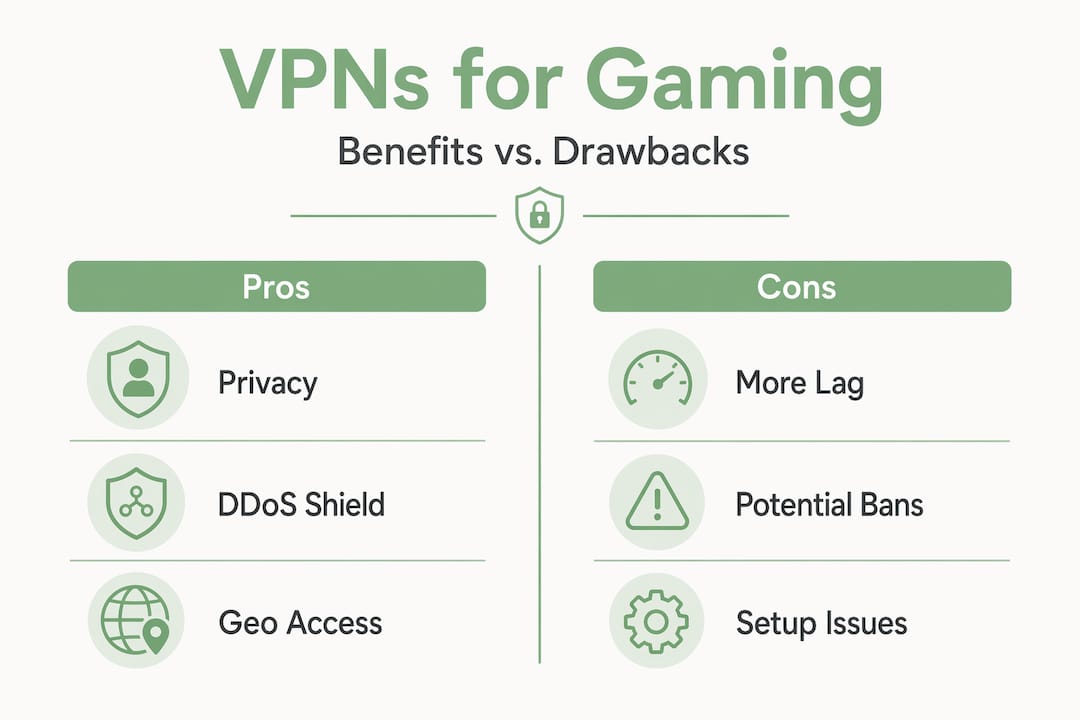
On the technical side, VPNs can cause NAT (Network Address Translation) issues that break matchmaking. Many VPN servers use shared IPs, which can result in a strict or moderate NAT type. That restricts who you can connect with in lobbies and can make finding matches slower or impossible in some games.
Here are the main risks to keep in mind:
- Matchmaking failures: Strict NAT from shared VPN IPs can prevent lobby connections
- Anti-cheat flags: Frequent region switching can trigger anti-cheat systems even without any actual cheating
- Account bans: Using a VPN to evade an IP ban or manipulate skill-based matchmaking is a Terms of Service violation in most games
- Increased latency: In competitive games where 10 ms matters, even a small ping increase from a VPN can hurt your performance
- VPN blocks: Some games and platforms actively detect and block VPN traffic
The risk from VPN use depends more on behaviour than on the VPN itself. Running a VPN for privacy while playing on your home server is very different from using it to dodge a ban or jump regions to find easier lobbies. The first is generally fine. The second puts your account at serious risk.
Pro Tip: If you’re using a VPN purely for privacy or DDoS protection, connect to a server in your own country or region. You get the security benefits without the matchmaking and latency penalties that come from connecting to distant servers.
How to set up a VPN for gaming the right way
If you’ve decided a VPN makes sense for your situation, how you configure it matters as much as which one you pick.
- Choose WireGuard as your protocol. WireGuard is lightweight and usually the best choice when you care about gaming responsiveness.
- Test more than one endpoint. Try a VPN server close to you, one close to the game server, and one in a major network hub. The best endpoint is the one with the smoothest route, not always the closest one.
- Watch jitter and packet loss, not just ping. A tiny ping increase may be worth it if packet spikes, rubber-banding, or buffering improve.
- Use split tunneling if your VPN supports it. Route your game, launcher, voice chat, or cloud gaming app through the VPN while leaving unrelated traffic on your normal connection.
- Test during peak hours. Evening congestion is when alternative routing is most likely to make a difference.
- Disable features you do not need. Ad blockers, malware filters, and other VPN add-ons can add processing overhead. Turn them off during gaming sessions unless you specifically need them.
- Stick to paid, reputable services. Free VPNs are often slower, more congested, and less predictable. For gaming, stable endpoints matter.
Pro Tip: Check if your VPN supports a dedicated gaming server or optimised routing. Some providers offer servers specifically tuned for low-latency traffic, which can make a measurable difference.
My honest take on VPNs for gaming
A gaming VPN should not be sold as a miracle ping button. That is the wrong promise. The better argument is control.
Your ISP chooses a route for your traffic. Most of the time that route is fine, but sometimes it is congested, badly peered, or unstable at the exact time you want to play. A VPN gives you another path. That can mean smoother traffic, fewer spikes, better behaviour from cloud gaming, fewer buffering problems on launchers and streams, and better protection from people trying to expose or attack your home IP.
That is the practical use case: not blindly turning on a VPN and hoping numbers magically drop, but testing endpoints and choosing the route that behaves best for the game or service you are using.
If your connection is already perfect, you may not need one for performance. But if you see evening slowdown, erratic jitter, rubber-banding, launcher buffering, Discord dropouts, or unstable routes to particular servers, a VPN is a useful tool to test.
- Steve
Try Rapidrabbit for your gaming setup
If you want a VPN that gives you simple route choice without burying you in settings, Rapidrabbit is worth a look. It runs on WireGuard, which keeps overhead low, and it is available on Windows, Linux, and Android right now.

Rapidrabbit keeps your IP private, protects you on public Wi-Fi, and lets you test different endpoints when your normal route is congested or unstable. You do not need to be technical to use it. Just tap the carrot and you are protected. Check out how Rapidrabbit works to see exactly what is running under the hood, or head to the Rapidrabbit homepage to get started. FREE TRIAL AVAILABLE. No excuses not to test it on your own connection.
FAQ
Why do gamers use VPNs for connection quality?
Gamers use VPNs to test alternative routes, smooth traffic, reduce jitter in some cases, avoid congested ISP paths, protect their home IP, and secure public Wi-Fi connections. The benefit is route control, not a guaranteed lower ping.
Can a VPN get you banned in online games?
The VPN itself rarely causes a ban, but using it to evade IP bans or manipulate matchmaking violates most games’ Terms of Service and can result in account penalties.
What VPN protocol is best for gaming?
WireGuard is usually the best protocol for gaming because it is lightweight and responsive, making it a good fit for route testing, privacy, and low-overhead VPN use.
Do VPNs help with DDoS attacks in gaming?
Yes. A VPN hides your real IP address so that attackers target the VPN server instead of your home connection, keeping you online during an attack.
Should casual gamers bother with a VPN?
Casual gamers may benefit from VPN privacy, public Wi-Fi protection, smoother launcher downloads, improved cloud gaming stability, and alternative routing when their ISP path is congested. If your home connection is already stable, treat it as a useful tool rather than something you must always leave on.